Pages

Wednesday, February 6, 2013

CMS- My Top 3

charlesc, Drupal Cake
  Content management systems are becoming a fantastic way to develop sites, especially for larger ones. Why is this? Well, I came up with three reasons why I think they're great. Here they are:

1. Using a CMS takes all the technical "mumbo jumbo" you don't have to deal with.
When I mean "mumbo jumbo" I'm talking about all of the technical coding. Content management systems provide a non-technical way of creating new pages or updating content, without having to know any HTML. Content management systems also allow you to manage the structure of the site, like where the pages go and how they're all linked together. Some offer simple drag-and-drop reconfiguration of the site, without breaking any links. Almost all content management systems provide a web-based authoring environment, which makes implementing content easy.

2. It has many benefits for businesses that wish to operate a website.
 These days, almost all businesses of any kind have a website to enhance themselves. Having a CMS will improve the quality, reliability, efficiency, and overall, business performance. When it comes to marketing, a content management system can marketing campaigns and create landing pages for your site. A CMS provides you with the ability to quickly react to changes in the market place. Publishing workflow of your business is an option with a CMS as well to publish your content instantly. You can also prepare content to publish for a specific date, for example, if a company were offering sales, marketing campaigns, and PR.

3. It is cost effective.
 A good CMS for your site doesn't have to be terribly expensive, but the cost of not using one is likely to be even higher. In the long run you'll save money. Paying someone, to make all your changes and updates by hand can come at a large price. Sometimes if you hire a person, they will use a CMS anyway, just to make their own lives easier, but still charge you the cost of doing it manually. Whether you buy a system, have one built, or subscribe to a CMS service, they're a more cost-effective solution versus the alternative.

                                                          Helpful Article Sources:
https://www.trabian.com/articles/why-a-cms
http://www.jasonsalter.com/cms
http://its.fsu.edu/Web-Services/ITS-Web-Services/CMS


Thursday, January 17, 2013

CMS- What Is It, Why Is It Amazing?


CMS's are so amazing, parakeets are using them and tweeting with joy!
CMS's are so amazing that parakeets are using them and tweeting with joy!


What is a CMS? I had never heard of this acronym before, until this course. I have learned that CMS stands for computer management system. CMS’s are programs that easily allow people to create website pages online from a central interface. It lets users such as businesses, organizations, students, or anyone to publish, edit and modify content without having to deal with all of the internal coding. Perhaps you have used a CMS without even knowing!  Some examples of CMS sites are Drupal, WordPress, Moveable Type, Text Patten, Joomla!, RailFrog, this site Blogger.com, and more.  

 There are great advantages to working with CMS. Here are some that I think are quite useful:


  • These programs are based on a common web browser. Users can edit anywhere, anytime, without delays

  •  There is no HTML knowledge needed to use a CMS. People with little or no expertise in computer processing technology can easily use these systems.

  •  Navigation is automatically generated and adjusted. There are pre-made layouts that are simple and easy to use.

  •  All content is stored in a database. This central storage, means that content can be reused in many places on the website and formatted for any device. 

  •  A lot of CMS’S have active content, that bring variety to the content of a user’s page. For example, forums, polls, searching, newsreels, etc. could be included that can really spruce up a page.

  •  Some CMS’S feature content publication that can be time-controlled, hidden for later use or require user login with password.


All of these points are why people use CMS's. They are created to help you obtain your free speech on the web, without having to use difficult programs that would other wise take years to learn or having to rack your brain with coding. For more information on CMS's check ou this helpful article. Want to be apart of a CMS website? There are so many to choose from. I found this wonderful site that offers reviews for a vast array of content management websites. CMS's are an amazing tool to use that are sure to impress, without having to do much work!   

Thursday, January 10, 2013

Dreamweaver Assesment


This semester, I am going to learn more about the exciting world of creating websites! Today, my Advanced Internet Media professor went over a brief review/ introduction on how to start a website using the web developer, Dreamweaver. In this post, she wants my assessment of this web originator, discussing what works well for me, and what aspects of it are difficult.

I have used Dreamweaver in my Computer Mediated Comm. class, where I used the program to build a simple website about cooking. Although I was successful with my cooking website, I’ll admit, that this was a year ago, and I have forgotten how to use a lot of its features. I am glad that my professor went over some of the basics of it today, which helped me to remember some of the motions of this in-depth program.  I’m also grateful that she plans to post today’s lecture on Sakai, so that I can revisit it when needed! I have a vast amount more to learn about it, but so far here’s a list of what I like or am comfortable with about the program.
"Dreamweaver," Image Provided By: Amarand Agasi
 What works for me in regard to Dreamweaver: I like how this program is easy to get started with. Creating all of your data pages for your website and putting them into folders, makes it easy to just set up a pre-made template and begin plugging away at copying and pasting your info onto that handy template and simply applying it to all your pages.  


  • Dreamweaver gives you many template choices to choose from and work with. There are several layouts that are displayed horizontally, vertically, for example you can choose menus to the right or left, etc.
  • With Dreamweaver, you don’t have to manually code all of your data. It gives the user a split screen, so you can see all of the proper coding. Dreamweaver will also tell the user if there is broken code, this is extremely helpful.
  •  I like how Dreamweaver is laid out in terms of how it looks. There is a bar for adding links, the CSS tab is easy to locate, etc.

Dreamweaver is still a challenge, as it has a lot of features that I haven’t even delved into yet. I’m still learning about the program. For the most part, learning all of the intricacies of Dreamweaver is very much a work in progress for me right now, but through the learning process and the help of my professor, I will be able to create an even better website with more confidence using Dreamweaver, and I will love working with all of its creative realms!

Sunday, December 2, 2012

Toxic Valley as an iPad Game, Final Ideas


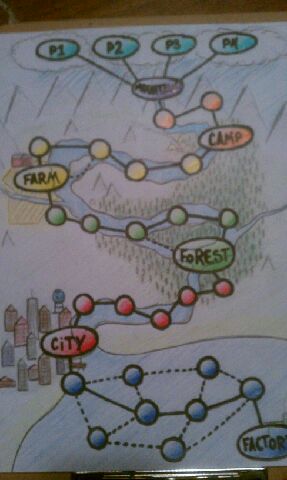
Photo Provided By: Daniel Rossbach "Toxic Valley Mini Game Board"
     Transforming our Game Design's group game, Toxic Valley into a digital game for the iPad is a little more challenging than building the actual board game, although I think this version will be just as fun! I want the iPad game of Toxic Valley to be a one player game with rewards after each level, and and even bigger reward at the end of the game. I also am going to incorporate physical elements utilizing some of the iPad's touch and movement features. All of the same watershed trivia will remain, as well as some other features of the board game. 
      I want to call the game, Toxic to Terrific, the iPad version of Toxic Valley. The game starts out with the player choosing either a male or female environmentalist avatar. After you choose your avatar and enter your name, you then have the option of reading the directions, viewing a tutorial of the game or both or skipping to play the game. 
     The rules of the game are as follows: The player's avatar has to make it through Toxic Valley from the mountains, to the forest, farm, city, all the way to the winning location, the purification center. The player's goal is to answer a series of questions correctly within each of those categories making sure they don't get any toxic tokens. There will be 10 questions per category. If you get a question wrong you get a toxic token. If you get three or more toxic tokens per level, you must start the level over. (The questions will be randomly selected for each level and there will be different questions for each time the game is played.) If you answer all of the questions correctly you move on to the next level and receive a star as your reward, thus moving you forward to the purification center. Once you get to the purification center, you earn a plaque with your name on it that you have made the Valley's watershed cleaner. 
Photo Provided By:  Blixt A. iPad
     Also, you have three chances for help throughout the whole game if you are stuck on a question. The game will give you the option of asking another environmentalist for help first, second, the player can guess the answer through hangman style, or third, the player can use the internet using google.
   Movement for the playing of the game- Use finger to move your avatar throughout the game,  you should stop once you get to a question. For example, if you are in the mountains level and you run into sludge from mountaintop removal coal mining, you would try to answer the question. These places will be called "Tox spots."  
   Then, after reading the directions it will go to a screen that has written information and a short video representing Toxic Valley about the importance of keeping the watershed clean after reading and or viewing how to play the game.  
    

Friday, November 23, 2012

Comics: Yes or No?


Photo Provided by: Jon Delorey
    Our assignment was to read two online examples and to determine if they have the elements involved to consider them actual comics, or graphic novels.  The first selection that I read was Scott McCloud's  "The Right Number", parts one and two. The main aspect that I think makes this piece a comic is that it has a story. Comics always tell some genre of story."The Right Number" is a romantic drama about a single man struggling with relationships and with  trying finding the right woman. Another aspect of this piece that makes it a comic is that it yields pictures, narration boxes, and text bubbles. I think that these features certainly compare to the elements of a traditional comic. The feature that made this web comic very unique was the method that one would read it. Instead of reading from left to right and from frame to frame, the reader clicks on the existing frame and the next frame comes into focus. I liked this aspect at first, until my head started hurting from the combination of reading one movement right after one another. This is definitely not a traditional comic, but an interesting type of comic, especially since Scott McCloud created it. I personally am not a huge fan of this style, but I did enjoy the story.
     The other online piece that I read is on a website that anyone can join. Additionally, they can upload comics that they have created themselves. This website  offers many different types of genres of comics that could appeal to young and old, and it is a site to show off talent and creativity in the realm of  producing comics. For example, I read a comic in the fantasy genre, called "Athra".  It is a continuing comic that features new parts of the story every Thursday. This comic I believe, is much more like a traditional comic in that it has proper frames that lead the reader onto the next page. It contains all of the traditional parts included in a paper graphic novel, except that it is online.
     I think that these comics are like traditional comics, but they are an updated species, or more modern spin off, of actual comics. I like how Scott McCloud and others who make comics for the web are exploring new ways to make comics fun to read!  

Friday, November 9, 2012

Ideas for iPad Version of my Group’s Board Game, Toxic Valley

Photo By:FHKE 

I am thinking of three versions of our game “Toxic Valley” for the iPad. Two of the versions would involve interaction with others, online and in person, and one version  would involve mini games for a single player to utilize alone for enrichment and remediation of the watershed vocabulary and concepts.
Photo By:games
One version would involve challenging other players via the Internet, much like the game “Song Pop” or “Words with Friends.”  The players may or may not know the persons that they are competing with. This version would be based mostly on facts and vocabulary dealing with the five different geological or man-made areas where pollutants impact the watershed.  It would be time-based where a question is presented and players compete to answer first and correctly.  There would be ten questions per game and the player with the most questions right would be the winner.
            The other version would be a computerized type of the original game where a group of players would gather around the iPad, taking turns playing via touch screen. Players would choose a region, mountains, farmlands, forests, cities, or industrial areas.  Their goal will be to navigate through their region, answering questions correctly and receiving as few toxic tokens as possible.  The screen would be set up with a “button” for each region at the bottom of the iPad.  When it is a players’ turn they click on their region and their section of the game board appears.  The first person to successfully get through their region with the least amount of toxic tokens is the winner.  Players then rotate regions for the next game, so that everyone has a chance to learn the facts for each section.
            The last version of this iPad game is a self-practice section.  It would feature mini games that reinforce watershed conservation concepts and vocabulary.  The games could be matching vocabulary words with their definitions, hangman using vocabulary words, flashcards (like the “Flashcardlets” app.), and multiple choice trivia questions.  This would be for practice and remediation and players could receive badges and levels for certain amounts of correct responses.


Thursday, November 8, 2012

The Unique Structure of Jeff Lemire's Essex County


Photo Provided By:  Comics212, Jeff Lemire  
     In Jeff Lemire's graphic novel Essex County,  there are three interesting stories that intertwine in one book. These tales take a look at ordinary people's lives in a rural town in Essex County, Canada. Book one entitled, Tales from the Farm, is about a young pre-teen boy named Lester who lives with his new caregiver, his Uncle Ken. Lester lives with him on his farm because his mother passed away from cancer. Lester soon becomes friends with the cashier of a local gas station, Jimmy Lebeuf who we find out is a washed up ex hockey player. The two outcasts get along, and Lester shares his love of super hero comics to Jimmy. Lester's Uncle Ken knows all about Jimmy Lebeuf and his past, and disapproves of Lester spending time with him. In the next book, Ghost Stories, Lemire delves into the life of Lou Lebeuf, Jimmy's brother. He is an elderly senile man who has lost his hearing. He narrates his life story and the up and down relationship with his brother. He also has to realize that his time is almost up, and he passes away at the end. The third book, The Country Nurse. Lemire's last book of Essex County  goes into the life of Lou Lebeuf's nurse. This books deals with the nurse's loss of her son, and her relationships with how she is connected to Lester, Ken, and the Lebeufs. This chapter really ties everything together, and gives the reader a realization and understanding of the story as a whole. 
     I like how the author doesn't just jump right out and reveal why Uncle Ken feels this way about Lester. He makes it an intriguing reading/viewing experience. Lemire does an amazing job structuring the the story in these three books because it makes to reader curious to find out more about these characters and how they tie into the story as a whole. He brings a lot more character development using this method or structure. All in all Lemire's structure for this novel is genius!

Tuesday, November 6, 2012

An Overview and Thoughts on Game-Based Learning


Photo Provided By: Center4EduPunx
My blogging research assignment on game-based learning has been very eye-opening.  It was interesting to research the use and effectiveness of game-based learning in the school, military and industrial settings. 
Being a digital native, I was very aware of the use of gaming as a learning tool in a school setting.  I have to agree with Bill Gate's assessment that game-based learning will be the future of education. I fully expect that my future children will have a much greater technology-based education than I had.  Students are so very motivated by learning through technology.  It provides a safe setting to learn and make mistakes, as well as instant rewards and feedback and remediation.  It was interesting to research recommended games and to find out that there are a wide range of learning games that can be used for experiences as basic as preschoolers learning colors, numbers and letters to medical school students learning the intricacies of human anatomy.
Photo Provided By: Paolo.Pace
       I was probably most shocked to find out that the US Military is the largest purchaser of game-based learning technology. Their use of game-based learning makes real sense considering that the majority of their new recruits are digital natives and already quite used to game-based technology. They have programs like "America's Army", that is used as a recruiting tool and programs that teach nearly every job that is done in a military setting.  They also save a great deal of money, lives, and equipment by using simulators to teach the use of equipment, vehicles, and weaponry.  This makes a lot of sense and keeps highly expensive machinery from being damaged during practice.
Photo Provided By: pheaber
   I knew that game-based learning was used in industry, but was unaware of the extensiveness of its usage.  Game based learning can teach everything from job skills, the use of equipment and machinery, customer service techniques to the proper serving size of products.  The better educated workers are about all aspects of the company that they work for the more money a company makes and saves. Additionally, I found that the use of simulators in the medical community quite fascinating.  It’s good to know that doctors, nurses, and dentists have a safe place to practice their skills before they use them on me!
       Overall, this study on the use and effectiveness of game-based learning has shown me that in all areas game-based learning provides a motivational, safe realm for effective learning that provides essential practice and feedback.  Schools, the military, and industry are destined to keep game-based education as a tool of their teaching and training for a long, long time.


Sunday, October 28, 2012

Game-based Learning in the Medical Field


     The idea for this post came to me while visiting my sister at medical school this past weekend.  I knew I wanted this posting to be an expansion of the uses of game-based learning in industry, but I wasn’t 100% certain of which direction to take until my sister told me about working with the patient simulators in the technology lab at her school. 
She attends the West Virginia School of Osteopathic Medicine (WVSOM) in Lewisburg, WV, a school that leads the country in producing physicians who give optimal patient care.  One of the many reasons for their success has to with their practice on patient simulators, or as the students call them, robots.  WVSOM has an entire wing of their technology building modeled to look like patient rooms in a doctor’s office, emergency room, or hospital environment.  Each of these patient rooms contain robots modeled after men, women and children in need of medical care.  
Photo Provided By:Robert Couse-Baker
      While these simulators certainly don’t replace actual patients, they give the medical students at WVSOM the opportunity to learn and to practice their new skills in a safe environment without the fear of harming an actual patient when trying a procedure for the first time.  All of the patient simulators have pulses, a heartbeat, lung sounds, their chest that moves up and down, they have pupillary light response, they can blink, have a blood pressure and can speak with the aid of a facilitator.  Their heart has real rhythms that can be programmed into arrhythmias and the can be given CPR chest compressions and defibrillation, if needed. Student doctors can administer medications to them, take their blood pressure, put in IVs, intubate them, administer CPR to them and do many other procedures.  There are even specialized simulators like Harvey, who simulates actual heart and lung sounds, or Noel who gives birth.       Each of these robots provides the student doctors with important training before they attempt these procedures on a real patient.
     It’s not just medical schools that use simulators. Dental students at the Medical College of Georgia, and other schools of dentistry, use simulators to practice patient care and to do tricky procedures like tooth implantation or extraction.  Many university hospitals have surgical programs or simulators that allow doctors to practice difficult surgeries via computer or simulator before doing the actual procedure on a real patient. Programs, like “Pulse” that provide civilian and military doctors a place to practice patient care and clinical skills.  There are even computer games, like “Free Dive,” that are used as a distraction to manage pain in pediatric patients while they are undergoing painful procedures. In this game, children can simulate an undersea dive and experience the peaceful life in the ocean, as the doctors attend to their needs.
     Game-based learning is a very effective tool in so many realms.  Its use in the medical field provides a safe playing field for student doctors and dentists, as well as practicing dentists, physicians and other medical staff to practice many areas of patient care and procedures.


Tuesday, October 23, 2012

Compare and Contrast Framing: Maus II and Essex County, Book Two, Ghost Stories

Photo By: Hannah Parker
 

Throughout this semester of this course, we were to choose three additional graphic novels from a list to read from. My first choice, that I eagerly selected was Art Spiegelman’s Maus, A Survivor’s Tale Part II, And Here My Troubles Began. After reading Part I, I was intrigued and adamant to know what the rest of Vladek’s story consisted of. Although, for this particular blog my mission is to compare and contrast frame usage of Spiegelman’s Part II of Maus, and that of Jeff Lemire’s Essex County, Book Two: Ghost Stories. Though both books are very much different in style and story a few comparisons could be made about frame usage. 
 
Comparisons of frame usage:


Both Spiegelman and Lemire use mostly simple closed square or rectangular frames for their illustrations and text. 


The authors both use large frames, especially
Lemire, to give the reader a more detailed close up view.


      They both briefly use actual pictures or drawn pictures within the frame or  the area surrounding it to tell their stories. When Lou LeBeuf from Essex County, finds his and his brother’s old scrapbook, the reader sees an illustrated image of a scrapbook with photos and memorabilia. Spiegelman shows an actual photo of Vladek, and drawn photos surround his frames.  


  Contrasts of frame usage:

  Lemire uses up a lot of space with his frames, where as Spiegelman’s frames are very close together, unified and crowded.

       In Book Two: Ghost Stories, there were a lot more close-ups on the character’s faces, and almost hardly any close-ups in Maus Part II. 


             Lemire uses a lot more one-page frames than Spiegelman.

I think that Art Spiegelman uses these types of framing methods because there is much more dialogue between the characters than in Essex County. Also, it may be conceptual that his frames are so crowded and tight because that’s how his father, Vladek felt, cramped and crowded during his rough times during the Holocaust. I also think that Jeff Lemire uses large images because it allows him to shows a lot of movement, or action packed scenes in his novel.